Artlume: AI Video Gen
- 0.0
- Rating
- 10.00K
- Installs
- Free
- Price

 Analysis by App-foxy
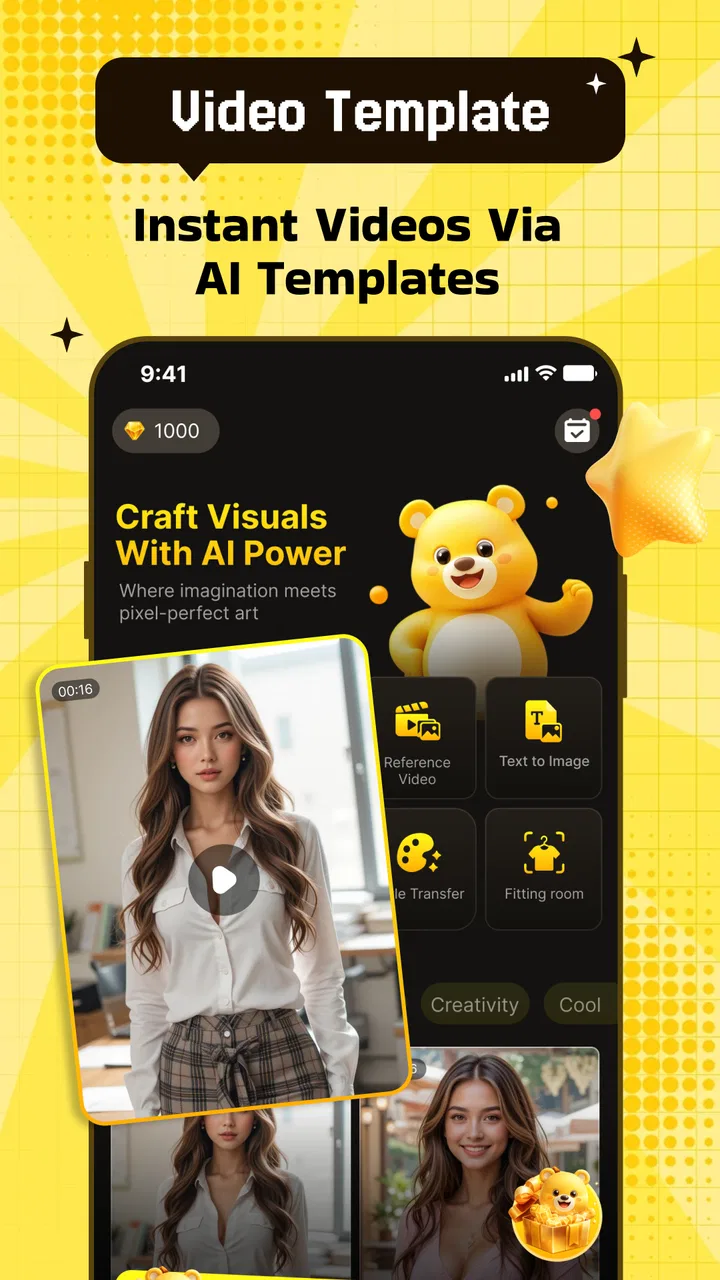
I spent time with Artlume: AI Video Gen as a creative editing app, and my first impression was that it is aimed at people who want to move from a still image to a short, expressive video without opening a full desktop editor. Its focus sits between photo design and lightweight video creation: you bring in an image, choose a visual direction, apply creative treatment, and refine the result until it feels ready to share.
That sounds simple, but the difference between a useful AI video tool and a frustrating one usually comes from the workflow. Artlume is most enjoyable when I treat it as a rapid idea generator rather than a replacement for a complete production suite. It can help turn an ordinary portrait, travel photo, product image, or illustration into something with motion and atmosphere. It is less suitable when I need exact keyframes, detailed audio editing, frame-by-frame control, or a carefully repeatable professional pipeline.
Developed by Uğur Cebeci, the app belongs to the Art & Design category and is free to install. It has a Mature 17+ content rating, so I would not choose it casually for younger users. The current release is version 1.0.0 and it runs on Android 7.0 or later. That broad operating-system support makes it accessible on older compatible phones, although the experience will naturally depend on the device’s processing ability and available storage.
You May Also Like

 AccuWeather: Weather Radar
AccuWeather Review: A Quick, Clear Forecast for Everyday Decisions
For everyday plans, the best forecast is the one you can understand quickly. AccuWeather makes rain timing, radar, and local conditions easy to act on, with a few trade-offs.

 Hill Climb Racing
Why Hill Climb Racing Still Turns Crashes Into One More Run
A tiny car, a bumpy hill and one more upgrade: Hill Climb Racing keeps resurfacing because its simple chaos makes every near-miss feel personal.

 AliExpress - Shopping App
AliExpress Makes Global Shopping Feel Personal, but Shoppers Bear the Risk
AliExpress turns a global marketplace into a pocket-sized discovery engine. Its reach is useful, its shopping loop compelling, and its trade-offs easy to miss.

 Lords Mobile: Kingdom Wars
Lords Mobile Is a Kingdom-Building Routine, Not a Quick Match
A case-by-case verdict on the building, battles, device demands, and social commitments that make Lords Mobile rewarding for some players and exhausting for others.

 PDF Scanner app - TapScanner
TapScanner Makes Paperwork Easier to Capture, Check, and Share
TapScanner makes scanning with a phone feel less like a rescue operation and more like a dependable step in getting work done. Its capture tools are useful, though not flawless.

 Block Blast!
Block Blast! Shows How Much a Puzzle Game Can Leave Out
A quiet grid game shows why puzzle players increasingly value instant clarity, repeatable skill and low-pressure play—and where the genre still needs to catch up.
More From Our News Desk
View All News


How I use Artlume from a still image to a finished clip
I start with a photo that already works on its own, then use Artlume to explore motion and mood rather than expecting it to repair a weak image. In this section, I’ll focus on choosing a source, testing a restrained treatment, and checking the result before sharing. That simple sequence also makes it easier to spot whether a snag comes from the image, the workflow, or the app itself.
Starting with the right source image
The most important decision happens before I touch an effect. I get better results from a clean image with one obvious subject than from a busy photo containing several people, tiny details, and a complicated background. A face with reasonable lighting, a product photographed against separation, or a landscape with a clear foreground and background gives the creative treatment more room to work.
I also avoid cropping too tightly when I know I want movement. Leaving some breathing room around a person or object makes the finished animation feel less cramped. This is one of the practical habits that is easy to miss when an app promises an instant transformation: the source image still controls much of the final impression. Artlume can add a creative direction, but it cannot fully rescue a blurry or poorly composed original.
Building a first version before fine-tuning
My usual process is deliberately short. I import one image, try a restrained creative treatment first, and create a baseline result before experimenting. That initial version gives me something to compare against. Without it, it is easy to keep selecting increasingly dramatic options simply because they look exciting in isolation.
For a social post, I usually ask myself whether the subject remains easy to recognize after the effect is applied. For an invitation, mood board, or personal memory, I am more willing to accept an abstract result. The same image can serve both purposes, but the successful setting is different: clarity matters more for communication, while atmosphere can matter more for visual experimentation.
Using templates as starting points, not final answers
The templates are most useful when I use them to discover a direction quickly. I do not assume the first attractive template is automatically the best match for the image. A dramatic treatment can overpower a quiet portrait, while a subtle treatment may disappear against a high-contrast city scene.
I find it helpful to judge the result in three passes. First, I check the overall silhouette and composition. Next, I look at the subject’s face, hands, or important edges. Finally, I watch the clip at its normal pace rather than pausing constantly. A result that looks impressive in a still preview can feel distracting once the motion plays continuously.
Making small edits instead of endlessly restarting
Artlume works best for me when I make one change at a time. If I change the template, effect, crop, and overall visual treatment together, I lose track of what improved the clip. A repeatable habit is to keep the source image fixed while testing creative variations. Once I find a promising direction, I can adjust the image or edit choices around it.
This approach also makes the app feel faster, even when the creative process itself takes time. I am not searching randomly; I am comparing controlled alternatives. For someone creating a series of related posts, that discipline helps maintain a consistent visual mood without forcing every image into exactly the same look.
What I check before sharing
Before treating a result as finished, I watch it from beginning to end and check whether the main subject stays visually stable. I also look for moments where an effect becomes more noticeable than the image itself. If the clip is meant to communicate a message, I prefer a version that is slightly less spectacular but easier to understand.
I would also keep the original photo. That sounds obvious, but it matters with any creative transformation: the generated video is an interpretation, not a replacement for the source. Keeping the original lets me try a different direction later, compare versions, or use the same image in another project without degrading the starting material.
Settings and choices worth checking early
The first settings I pay attention to are the ones that affect the relationship between the image and the visual treatment. I look at the crop, the intensity of the chosen style, and whether the selected template supports the subject’s shape. These choices are more valuable than simply selecting the most elaborate effect available.
Portraits need special care. A face can remain recognizable while still looking unnatural if the treatment exaggerates movement or changes the surrounding atmosphere too aggressively. I prefer to begin with a moderate look, then increase the creative character only if the facial details remain believable. For product images, I use the opposite priority: clean edges and readable branding matter more than expressive distortion.
For landscapes, the strongest option is not always the one with the most motion. A restrained treatment can preserve depth and make the result feel like a moving postcard. If the scene already contains strong lines, such as roads, buildings, or a shoreline, I avoid adding so much visual activity that those lines become difficult to follow.
Choosing a repeatable visual language
One useful habit is to decide what the video is supposed to feel like before choosing a template. I might aim for calm, energetic, dreamy, dramatic, or playful. That single word gives me a filter for rejecting options that are technically attractive but emotionally wrong.
This matters when creating several images for the same event. If I am preparing a small sequence from a birthday, trip, or art project, I would rather use related treatments than collect unrelated effects. Artlume is well suited to quick visual variations, but consistency still has to come from the person using it. The app can accelerate selection; it does not replace editorial judgement.
Understanding the cost before committing to a workflow
Artlume is free to use as an app, while in-app purchases range from $1.99 to $99.99 per item. I would explore the free experience first and decide whether the available creative workflow genuinely fits my needs before paying for anything. That is especially important for occasional users who only want one animated image now and then.
For frequent creators, the right question is not simply whether a paid option unlocks more possibilities. I would ask whether it saves enough time, improves the type of output I actually make, or removes a limitation that affects my regular workflow. A large purchase makes less sense if I still need another editor for the final composition, sound, captions, or precise timing.
Faster patterns for everyday projects
My quickest useful pattern is to prepare a small group of suitable images first, rather than opening the app with no plan. I choose photos with a similar purpose, such as several product shots or a set of travel scenes, then test one representative image. If the visual direction works, I can apply the same thinking to the rest instead of beginning from zero each time.
A realistic example is a small business owner preparing a weekend social post. They could photograph a new item in clean light, use Artlume to give the still image a short creative treatment, review the result for readable details, and then place the video into a separate publishing workflow. The advantage is speed and visual interest. The trade-off is that the app should not be expected to handle the entire marketing job, especially if the post needs carefully timed text, pricing, narration, or branded layouts.
Another pattern works well for personal memories. I select one strong image from a day out instead of feeding the app every photograph I took. A single well-chosen scene often makes a more coherent short video than a collection of weak images. I then compare a subtle and a more expressive treatment, choosing the one that preserves the feeling of the original moment.
Keeping experiments organized
When I am testing several directions, I use simple names or notes outside the creative process so I remember what each version was meant to achieve. Even without inventing special project-management features, this small habit prevents confusion between a portrait version intended for sharing and an abstract version intended for inspiration.
I also avoid judging every result immediately after creation. A short break helps reveal whether the effect is genuinely appealing or merely surprising because it is new. This is particularly useful with AI-assisted visual work, where novelty can disguise awkward motion or a loss of subject identity.
Where experienced use still meets hard limits
Artlume’s appeal is its accessibility, but that accessibility also defines its limits. I would not use it as my main tool for a music video, a detailed advertisement, a film sequence, or any project requiring exact control over movement. A conventional video editor is better when I need a timeline, layered media, precise cuts, audio mixing, captions, transitions, and dependable repetition from one scene to the next.
It is also not the ideal choice for someone who wants to draw every visual decision manually. Artlume encourages a guided, effect-led workflow. That is helpful when I want an idea quickly, but it can feel restrictive when the creative goal depends on exact placement or a carefully designed animation path.
Another limitation is the need to inspect results rather than trusting the preview blindly. AI-style transformations can produce a clip that looks appealing at a glance but loses important details during motion. Faces, hands, thin objects, text inside an image, and repeated patterns deserve a closer look. If any of those elements carry meaning, I would treat review as essential rather than optional.
When another app is the better choice
I would choose a traditional mobile video editor when the project is built around multiple clips, spoken audio, subtitles, or exact timing. I would choose a dedicated photo editor when the image itself needs careful retouching before animation. I would choose a design-focused tool when the priority is a polished poster, presentation, or branded layout rather than an expressive moving image.
Artlume makes more sense when the starting point is a photo and the desired outcome is a quick creative video treatment. That distinction is important. It is not competing with every tool in the broader editing category; it is most useful in the narrow space between a finished still image and a shareable visual experiment.
Who should try it and who should skip it
I recommend trying Artlume if you regularly have photos that feel static but do not want to learn a complex editor. It is a good fit for casual creators, visual hobbyists, social users, and anyone who likes testing different moods from the same source image. The free entry point makes experimentation straightforward, while the creative effects and templates provide a faster starting point than building motion manually.
I would be more cautious if you need guaranteed consistency, exact animation control, or a complete editing environment. Professional creators may enjoy it as an idea-generation step, but they should expect to finish elsewhere when a project demands precision. I would also skip it for younger users because its content rating is Mature 17+.
My verdict after building a repeatable habit
After using a baseline-first workflow, checking the image-to-effect relationship, and reviewing each result at normal playback speed, I find Artlume more useful than its brief store description suggests. Its real strength is not that it eliminates creative decisions; it makes early experimentation easier. I can turn a suitable still image into several visual directions quickly, then keep the version that best serves the subject.
The app is less convincing when I ask it to behave like a complete production tool. The absence of precise, hands-on control would matter to anyone building a carefully timed sequence, and the in-app purchase range means frequent use deserves a deliberate cost decision. Those are not minor details; they determine whether the app belongs in your regular toolkit or only in your occasional experiment folder.
My final recommendation is simple: use Artlume when you want a photo to become a compact creative video and you value speed over detailed manual control. Start with a strong image, keep the first treatment restrained, compare variations rather than chasing novelty, and inspect important details before sharing. The best results come from treating the app as a focused creative accelerator, not as a substitute for every other editing tool.
With that mindset, Artlume earns a place on my phone for quick visual ideas, personal projects, and lightweight social content. It is free to begin, supports Android 7.0 and later, and comes from Uğur Cebeci in a compact version 1.0.0 release. I would recommend it to a friend who wants an approachable way to animate photos, while being clear that anyone needing a full timeline-based studio should look elsewhere.
FAQs for Artlume: AI Video Gen
01What is Artlume: AI Video Gen and what can it do?
Artlume: AI Video Gen is an AI-powered creative app designed to turn written prompts, images, or creative ideas into short video content. It can be useful for making social media clips, animated concepts, visual experiments, and promotional material without requiring traditional video-editing skills. Results depend on the prompt, source image, selected style, and the generation options available in the current version.
02Is Artlume: AI Video Gen free to download and use?
The app may be available to download at no initial cost, but some features can require credits, a subscription, or an in-app purchase. AI video generation generally uses considerable processing resources, so free access may be limited by daily generations, export quality, waiting times, or available styles. Before generating frequently, check the app’s pricing page and subscription terms carefully.
03Can I use my own photos or images to create videos in Artlume?
Artlume: AI Video Gen may allow users to upload personal images and animate or transform them with AI effects, depending on the supported input modes. Use clear, high-quality images for better results, and make sure you have permission to use any people, artwork, logos, or other copyrighted material included in your uploads. Avoid sharing sensitive personal information through creative files.
04Does Artlume create professional-quality videos suitable for commercial use?
Artlume can produce attractive and imaginative clips, but the output may not always be consistent or production-ready. Faces, hands, text, movement, and fine details can sometimes appear distorted, especially with complex prompts. Commercial use also depends on the app’s license, the assets you provide, and any restrictions attached to generated content, so review the current terms before publishing paid work.
05What should I know about privacy and account permissions before using the app?
Before using Artlume: AI Video Gen, review the permissions requested for camera access, photos, storage, notifications, and account information. These permissions may be necessary for uploading media, saving generated videos, or managing projects, but they should match the app’s stated purpose. Also check how prompts, uploaded images, generated content, and account data are stored or processed by the developer.
Pros
- Turns text prompts into short videos with minimal editing skills.
- Useful for creating social media content
- ads
- and visual concepts quickly.
- AI-generated visuals can help spark ideas during creative projects.
- Cloud-based workflow makes projects accessible across supported devices.
- Simple interface lowers the learning curve for first-time AI video users.
Cons
- Results may vary significantly depending on prompt wording and detail.
- Complex scenes
- faces
- and hand movements can contain visible AI artifacts.
- High-quality video generation may require a subscription or paid credits.
- Rendering times can increase during busy periods or for longer clips.
- Generated content may need manual editing before professional publication.

Artlume: AI Video Gen
Gallery